

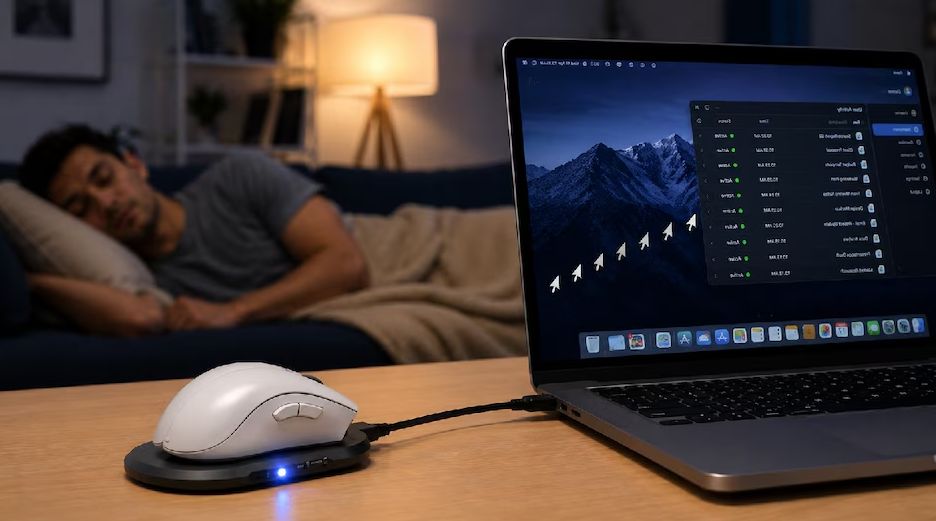

Work From Home Mouse Mover: This Small Device Keeps Your Computer Active
Work from home has become common for many employees. People can work from their homes using a laptop, internet connection and online communication tools. But some companies also use employee monitoring software to check whether workers are active during office hours.
Now, a small device called a mouse mover or mouse jiggler is getting attention because it can automatically move a computer mouse.
What Is a Mouse Mover?
A mouse mover is a small device designed to move a computer mouse automatically.
It can create regular mouse movements without requiring a person to move the mouse manually. Some devices are designed to look like a normal computer accessory and can be connected or placed near a mouse.
The main idea is simple: the mouse keeps moving, so the computer may not show the user as idle.
According to a recent Aaj Tak report, some mouse mover devices are being marketed toward people working from home who want to avoid appearing inactive on their computers.
How Does a Mouse Mover Work?
The working process is quite simple.
A physical mouse mover can move the mouse automatically at regular or changing intervals. Some models offer different movement patterns and adjustable timing.
For example, a device may move the mouse after a certain period instead of keeping it completely still.
This can make the computer register mouse activity even when the user is not physically moving the mouse.
Some products advertise random mouse movement and adjustable intervals, such as movement every few seconds.
Why Are People Using Mouse Movers?
One major reason is remote work monitoring.
Some companies use employee monitoring tools to check activity on company computers. These tools can look at information such as mouse activity, keyboard activity, idle time and application usage.
This has created a debate around employee productivity tracking and workplace surveillance.
A mouse mover attempts to create artificial computer activity. However, simply moving a mouse does not prove that an employee is actually working.
Can a Mouse Mover Fool Employee Tracking Software?
It depends on the monitoring system.
Basic systems that mainly look for mouse movement may treat the movement as computer activity. However, modern employee monitoring systems can use other signals to identify unusual or artificial activity.
For example, some workforce monitoring tools can look for unusual activity patterns and potential mouse-jiggler behavior. ActivTrak says its system can use pattern recognition, software identification and duration analysis to detect potentially artificial activity.
This means a mouse mover is not necessarily invisible to employee monitoring software.
Mouse Movement Does Not Always Mean Productivity
This is one of the biggest issues with employee tracking.
A person can be working without constantly moving a mouse. They may be reading a document, attending a meeting, thinking about a problem or writing notes.
On the other hand, a moving mouse does not automatically mean that someone is doing productive work.
This is why employee productivity tracking, remote employee monitoring and digital workplace surveillance have become controversial topics.
Are Mouse Movers Safe to Use at Work?
The device itself may be a simple computer accessory, but using one to deliberately create fake activity can create problems at work.
Companies may have policies about employee monitoring, work hours and computer usage. If an employee uses a mouse mover specifically to misrepresent their work activity, it could potentially violate company rules.
There have also been previous cases where companies investigated employees for using tools designed to simulate computer activity.
Employees should therefore understand their company’s policies before using any device intended to manipulate activity tracking.
The Bigger Work From Home Debate
The popularity of mouse movers highlights a bigger question: Should productivity be measured by mouse movement?
Remote employees are increasingly monitored through digital tools. Some software can track mouse activity, keyboard activity, idle time and applications.
At the same time, companies want reliable ways to understand productivity when employees are working remotely.
Experts and technology companies are therefore exploring better ways to measure work based on actual results rather than only computer activity.
What Is the Future of Employee Monitoring?
Employee monitoring technology is becoming more advanced.
Modern systems can analyze different types of activity instead of depending only on mouse movement. Some platforms are also developing ways to detect artificial activity.
This means the simple mouse jiggler may not always be an effective way to avoid monitoring.
The bigger trend is clear: remote work, employee monitoring, productivity tracking and workplace technology are becoming closely connected.
NEXT NEWS – https://bh24news.com/satya-niketan-building-collapse-delhi/